

Notifications
Clear all
FAQs
1 Posts
1 Users
0 Reactions
2,177 Views
Topic starter
Why do so many of my mailshots end up in a patient's spam folder?
There are a number of reasons your e-mails may be identified as being "spam" by the recipients e-mail provider.
1. Proper authentication
To reduce the chances of your emails going to the junk folder, you need to make sure that they are properly authenticated.
The three most popular authentication methods include SPF, DKIM, and DMARC.
The best way is to comply with this is to send e-mails from your own web site domain, rather than using a generic e-mail provider such as Google or Yahoo. The vast majority of spam messages come from generic e-mail accounts.
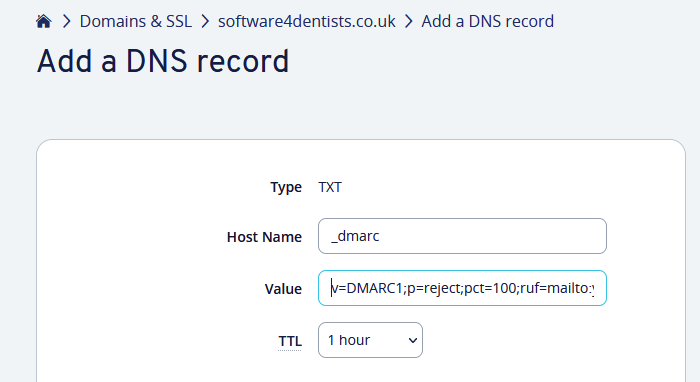
Here is an example of adding DMARC authentication to your e-mail domain. This is based on a domain supplied by IONOS but your domain supplier should have something similar.
Go to your domains and add a new txt based DNS record.
The host name should be something like:
_dmarc
and the value should be set to:
v=DMARC1;p=reject;pct=100;ruf=mailto:youremail@yourdomain.com
2. No “unsubscribe” option
E-mails that do not have a visible “unsubscribe” option could be marked as spam. This is because laws in the UK and Europe require companies and individuals that use email marketing to give recipients the option to opt-out of any messages used for commercial purposes.
3. Sender information
E-mail service providers require that all sender information such as the name of the sender, email address, and domain name, are accurate and clearly visible.
4. Spam triggers
There are several words, punctuations, and emojis that e-mail service providers mark as spam triggers, including writing in upper case, using numerous exclamation points, unusual fonts, and words like “click here".
5. Bad e-mail list
Sending e-mails in bulk to an untested group of recipients is generally considered risky. E-mail service providers are most likely to mark it as spam if there are a lot of inactive addresses, or if the majority of the recipients don’t open the e-mail message.
6. Subject lines
Misleading subject lines can prompt recipients to open the email and then mark it as spam. Subject lines that include words and phrases like “urgent”, or any other statement that’s not even remotely related to the content of the e-mail can trigger spam filters.
7. Links
An e-mail that contains links alone can be flagged as spam, especially in e-mails used for commercial purposes.
8. Recipient marked as spam
Finally, even if a sender complies with all of the above, if even just a few recipients report your e-mail as spam (normally with a simple click of a button), it may start a domino effect and cause your deliverability to crumble.
Dental Software uk
Posted : 14/07/2022 2:54 pm
