

Notifications
Clear all
FAQs
1 Posts
1 Users
0 Reactions
499 Views
Topic starter
Recent Update to Remote Desktop (RDP) Connections
Microsoft has recently introduced a security update that changes how Remote Desktop (RDP) connections are initiated. As part of this update, you may now see a security prompt when launching your connection.
This change has been implemented by Microsoft to enhance protection against phishing and unauthorised remote connections. More details can be found here:
https://windowsforum.com/threads/april-2026-rdp-security-warnings-block-redirections-stop-rdp-phishing.412699/
As Bridge-IT uses this technology, you may have noticed a new connection dialog appearing after a recent Windows update.
What you may see
If the banner at the top of the connection window is orange and displays:
“Caution: Unknown remote connection”,
this usually means you are using an older Bridge-IT shortcut.
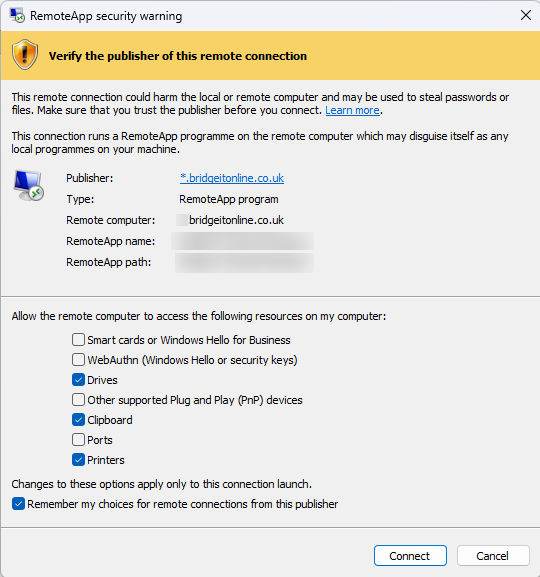
This connection will still work as normal. However, when connecting, we recommend ensuring the following options are selected:
- Drives
- Clipboard
- Printers

Recommended Update
We can provide you with an updated connection link which offers two key improvements:
- The security prompt will display:
“Verify the publisher of this remote connection”, showing *.bridgeitonline.co.uk as the publisher - Your selected connection options (e.g. Drives, Clipboard, Printers) can be saved, so you won’t need to reselect them each time
This topic was modified 6 months ago 3 times by S4D Administrator
This topic was modified 6 months ago by Daniel Vernall
Posted : 17/04/2026 8:27 am
